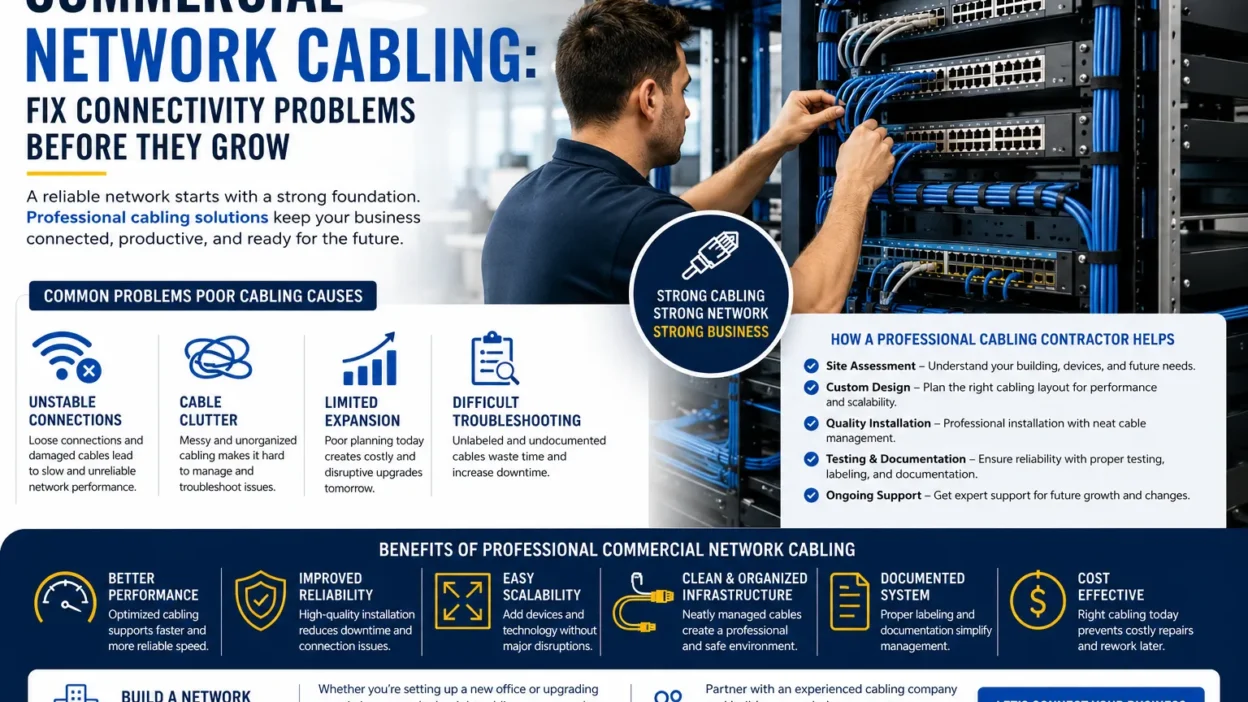
A reliable network is essential for businesses that depend on computers, cloud applications, video conferencing, shared files, security systems, and connected devices. When the underlying cabling is poorly organized or no longer meets business requirements, employees may experience slow connections, unexpected disconnections, and unnecessary downtime.
These problems are not always caused by the internet provider. Damaged cables, loose connectors, outdated wiring, poorly planned cable routes, and overloaded network equipment can also affect performance. Without an organized infrastructure, even a small fault may take longer to identify and repair.
Commercial network cabling provides the physical foundation for connecting business devices and network equipment. A properly planned system helps organizations maintain reliable connections, simplify troubleshooting, and accommodate changing technology needs.
Whether you operate an office, retail store, warehouse, or commercial facility, understanding your cabling requirements can help you avoid common infrastructure problems and make better decisions about upgrades.
1. Recognize the Warning Signs of an Outdated Cabling System
Cabling issues often develop gradually. A network may work adequately at first but struggle as more employees, devices, and applications are added.
Look for these warning signs:
- Frequent disconnections: Computers or other wired devices repeatedly lose their network connection.
- Inconsistent network speeds: Employees experience slow file transfers or unreliable access to shared resources.
- Unorganized cables: Tangled wires make equipment difficult to maintain and connections difficult to trace.
- Limited network expansion: Adding new workstations requires temporary cables or complicated changes.
- Recurring connection faults: Technicians repeatedly discover loose connectors, damaged cables, or faulty network ports.
- Poor documentation: Staff cannot easily identify which cable connects a workstation to a network switch.
These symptoms do not automatically mean the cabling needs replacement. Network congestion, failing switches, incorrect configurations, and internet service problems can cause similar issues. A professional assessment helps identify whether the physical infrastructure is contributing to the problem.
2. Understand What Commercial Network Cabling Includes
Commercial network cabling involves designing and installing the physical connections that allow computers and other business devices to communicate.
Depending on the building and network requirements, the installation may include Ethernet cables, wall outlets, patch panels, telecommunications rooms, equipment racks, cable pathways, and fiber optic links.
A structured cabling design organizes these components into a manageable system rather than relying on scattered connections and temporary wiring.
For example, an office may use copper Ethernet cabling to connect employee workstations to network switches. Fiber optic cabling may connect different floors, equipment rooms, or separate buildings when longer distances or higher bandwidth are required.
The correct design depends on several factors, including building size, cable distances, required network speeds, connected equipment, and expected growth.
A well-organized infrastructure also makes future maintenance easier because technicians can identify connections and trace faults without unnecessarily disturbing other devices.
3. Choose the Right Cabling for Your Business
Selecting the correct cable type is important for performance, compatibility, and long-term value. The best option depends on the purpose of each connection rather than simply choosing the newest or most expensive cable.
Copper Ethernet Cabling
Copper Ethernet is commonly used for desktop computers, printers, network phones, wireless access points, and other devices that require a wired network connection.
Cable categories such as Cat 5e, Cat 6, and Cat 6A offer different performance capabilities. The appropriate choice depends on required speeds, installation conditions, and the organization’s plans for future upgrades.
For standard Ethernet channels using twisted-pair copper cabling, the commonly specified maximum channel length is 100 meters, subject to the applicable cable category and installation requirements.
Choosing suitable cable and maintaining proper installation practices can help support consistent network performance.
Fiber Optic Cabling
Fiber optic cable transmits information using light. It is often used for high-bandwidth connections, longer-distance links, and connections between network rooms or buildings.
Fiber can be particularly useful when a business needs to connect multiple areas without relying on long copper Ethernet runs. It also offers resistance to electromagnetic interference.
However, fiber installations require compatible equipment, appropriate connectors, and suitable testing. The correct fiber type depends on the distance, network equipment, and intended application.
Structured Cabling Systems
Structured cabling brings the different parts of the network together through a planned layout. Standardized cable routes, labeled connections, patch panels, and organized equipment locations can reduce confusion during troubleshooting and upgrades.
Instead of adding cables wherever space is available, businesses can follow a consistent design that supports current needs and future changes.
4. Why Professional Network Cabling Installation Matters
Even high-quality cable may perform poorly if it is installed incorrectly. Excessive pulling force, tight bends, damaged connectors, unsuitable pathways, and poor termination can affect the reliability of a connection.
Professional network cabling installation begins with an assessment of the building and the business’s connectivity needs. The installer identifies suitable cable routes, determines outlet locations, selects compatible materials, and considers how the network may expand.
A quality installation should generally include the following steps:
- Site assessment: Review the building layout, current network equipment, and known connectivity problems.
- Installation planning: Map cable routes, workstations, equipment rooms, and network outlets.
- Cable selection: Choose appropriate copper or fiber cabling for the required distance and performance.
- Careful installation: Route and secure cables appropriately while following relevant standards and manufacturer guidance.
- Labeling and organization: Identify cables, ports, and outlets to simplify future maintenance.
- Testing and documentation: Verify installed links with suitable test equipment and record the completed connections.
Testing is especially important because a cable may look undamaged while still failing to meet the requirements of the intended network.
5. Avoid Common Cabling Mistakes That Increase Costs
Poor installation decisions can create problems long after a project is completed. Some mistakes are inexpensive to correct initially but become costly when the network expands or a fault interrupts business operations.
One common mistake is installing only enough cable for the current number of devices. When new employees join, the business may have to add temporary wiring or repeat parts of the installation.
Another mistake is failing to label cable runs and network ports. Without clear identification, technicians may spend unnecessary time tracing connections and locating faults.
Other issues include routing cables through unsuitable areas, ignoring cable bend-radius requirements, overcrowding equipment racks, and choosing materials without considering network speed or distance.
Businesses can reduce these risks by requesting a clear installation plan, confirming the proposed materials, and ensuring that testing and documentation are included in the project scope.
It is also helpful to consider future access points, printers, phones, cameras, and workstations before the installation begins.
6. How to Select a Commercial Cabling Provider
Choosing a suitable contractor involves more than comparing prices. The provider should understand commercial networking requirements and be able to explain how the proposed solution addresses your specific problems.
Before hiring a provider, consider these factors:
- Relevant experience: Ask about previous commercial cabling projects similar to your facility.
- Clear recommendations: The provider should explain why particular cable types and installation methods are appropriate.
- Testing procedures: Confirm how installed connections will be tested and verified.
- Cable management: Ask whether labeling, equipment organization, and documentation are included.
- Transparent estimates: Request a written scope covering materials, labor, testing, and any exclusions.
- Future flexibility: Make sure the design considers realistic business growth and potential equipment changes.
A dependable provider should also communicate expected timelines and explain how installation work may affect normal business operations.
For businesses upgrading an existing property, an initial inspection can help determine whether targeted repairs are sufficient or a larger cabling project would offer better long-term value.
7. Maintain Your Cabling Infrastructure After Installation
A completed cabling project should be supported by routine checks and accurate records. Over time, equipment changes, office moves, and additional devices can create disorganized connections if the infrastructure is not maintained.
Keep network rooms accessible, avoid putting pressure on cables, and update labels whenever a connection changes. Store cable test results and network diagrams in a location where authorized staff or service providers can access them.
If connectivity problems occur, record the affected devices, when the issue began, and whether other parts of the network are affected. This information helps technicians determine whether the issue involves cabling, network equipment, or another part of the system.
Businesses should also reassess their cabling needs when relocating offices, renovating commercial spaces, increasing employee numbers, or introducing new technology.
Regular maintenance cannot eliminate every network fault, but it can make the infrastructure easier to manage and help identify problems before they create larger disruptions.
Build a Network That Supports Your Business Goals
Reliable connectivity begins with a physical infrastructure designed around the way a business operates. Poor cable management, unsuitable materials, and inadequate installation planning can make network problems harder to diagnose and future upgrades more expensive.
Investing in properly planned commercial network cabling can help businesses organize connections, support connected equipment, and prepare for growth. The most effective solution starts with understanding current requirements, identifying existing problems, and selecting materials and installation practices that suit the building.
By combining professional planning, careful installation, appropriate testing, and ongoing maintenance, businesses can create a network foundation that is easier to troubleshoot and better prepared for changing technology needs.