
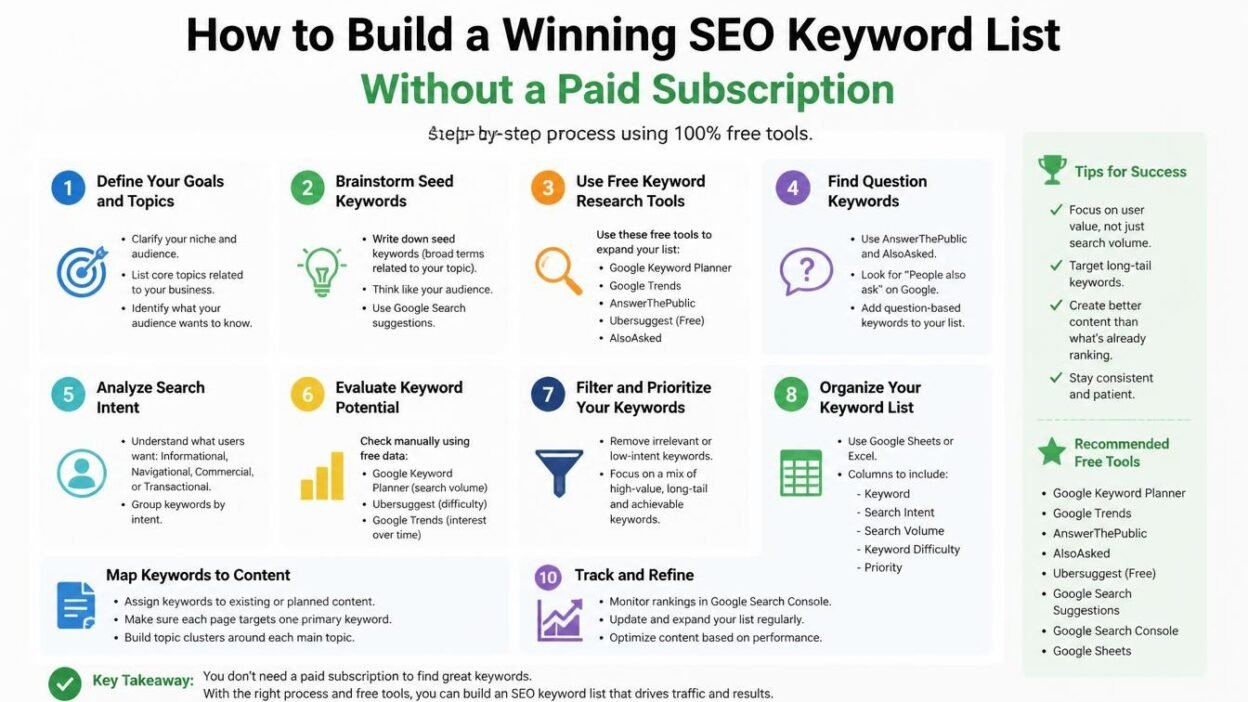
Creating a successful SEO strategy doesn’t always require expensive software or premium subscriptions. While professional SEO platforms offer advanced features, you can discover valuable search opportunities, understand your audience, analyze competitors, and build a powerful keyword list using free tools and practical research techniques.
The truth is that successful keyword research is not just about finding search terms with high search volume. It’s about understanding what people are searching for, why they are searching for it, and how your content can provide the best possible answer.
Whether you’re a beginner blogger, small business owner, affiliate marketer, or content creator, building a well-organized SEO keyword list can help you attract relevant organic traffic without increasing your marketing expenses.
In this guide, you’ll learn how to find relevant keywords, identify low-competition opportunities, analyze search intent, and organize your findings into a practical SEO keyword list using free resources.
Let’s get started!
1. Understand Your Website’s Main Topic and Audience
Before searching for keywords, you need a clear understanding of what your website offers and who you want to reach.
Many beginners make the mistake of collecting hundreds of random search terms without considering whether those keywords are relevant to their website. Using a keyword research tool free of cost can help you discover relevant search terms, understand what your audience is looking for, and identify valuable content opportunities without investing in expensive SEO subscriptions.
For example, if you run a website about digital marketing, your keyword research should focus on topics such as:
- Search engine optimization.
- Content marketing.
- Social media marketing.
- Website traffic growth.
- Email marketing.
- Online marketing tools.
- Blogging strategies.
These topics help you establish a clear direction for your research.
Start by answering three important questions:
- What products, services, or information does my website provide?
- Who is my ideal audience?
- What problems does my audience want to solve?
Once you understand these points, create a list of 5–10 broad topics related to your niche.
These topics will become your starting points for discovering more specific search opportunities.
Pro tip: Focus on topics that closely match your website’s expertise. Ranking for unrelated searches might bring visitors, but those visitors are unlikely to engage with your content.
2. Start With Google Autocomplete
Google Autocomplete is one of the simplest ways to discover what people are searching for. It displays suggested searches as users type queries into the search bar.
The best part? You don’t need an account or subscription to use it.
Here’s how to find keyword ideas:
- Open Google Search.
- Enter a broad term related to your niche.
- Look at the suggestions that appear automatically.
- Try adding different letters or words before and after your main topic.
- Record the most relevant suggestions in a spreadsheet.
For example, if your main topic is email marketing, you might discover suggestions such as:
- Email marketing for beginners.
- Email marketing best practices.
- Email marketing automation tools.
- Email marketing examples.
- Email marketing mistakes to avoid.
Each suggestion represents a potential content opportunity.
You can also experiment with question-based phrases:
- How to start email marketing?
- Why is email marketing important?
- What is email automation?
- Which email marketing platform is best?
These searches can help you understand the questions your audience wants answered.
Why it works: Autocomplete provides real search suggestions based on search activity and other contextual factors. However, suggestions are not proof of search volume or ranking difficulty. Treat them as research ideas that need further validation.
3. Use Google Keyword Planner for Search Insights
Google Keyword Planner is another useful resource for discovering keyword ideas without purchasing an SEO subscription.
Although it is primarily designed for advertisers, bloggers and website owners can also use it to explore keyword opportunities.
You can access it through a Google Ads account.
Here’s how to use it:
- Open Google Ads.
- Navigate to Keyword Planner.
- Select the “Discover new keywords” option.
- Enter your main topic or website URL.
- Choose your target location and language.
- Review the suggested keyword ideas.
- Export relevant suggestions for further analysis.
Keyword Planner provides information such as:
- Keyword suggestions.
- Average monthly search ranges.
- Competition levels for advertising.
- Historical search trends.
- Related search terms.
One important thing to remember is that its competition metric refers to advertising competition, not organic SEO difficulty.
For example, a keyword with low advertising competition isn’t necessarily easy to rank for organically.
Use Keyword Planner primarily to expand your keyword ideas and understand general search demand.
4. Discover Content Opportunities With Google Search
Sometimes, the best keyword research happens directly on Google’s search results page.
Searching for a topic manually can reveal useful information about search intent, competing content, and related questions.
Let’s say you want to create an article about website speed optimization.
Search for that topic and examine the following sections:
People Also Ask: This section displays questions related to your search. These questions can become subheadings, FAQ sections, or separate blog post ideas.
Related Searches: Scroll toward the bottom of the results page to find additional search phrases related to your topic.
Featured Snippets: Check whether Google displays a definition, list, table, or step-by-step answer. This gives you clues about the format users may find helpful.
Top-ranking pages: Review the pages appearing on the first page. Identify the subjects they cover, the questions they answer, and the information they may be missing.
For instance, a search about website speed might reveal additional topics such as:
- How to improve website loading time.
- Best image formats for websites.
- Website speed optimization checklist.
- How server response time affects SEO.
- Common website performance issues.
These ideas can help you create a more comprehensive content plan.
5. Explore Google Trends to Identify Growing Topics
A keyword might have decent search demand today but gradually lose popularity over time.
That’s why checking search trends is important when building a long-term SEO strategy.
Google Trends helps you understand how interest in a particular topic changes over time.
You can use it to:
- Identify topics gaining popularity.
- Compare interest between different search terms.
- Discover seasonal search patterns.
- Explore regional interest.
- Find related rising topics.
For example, imagine you’re researching the topic of artificial intelligence tools.
You could compare different topics, such as AI writing tools, AI image generators, and AI productivity tools.
The comparison may reveal which subjects are attracting increasing attention.
Google Trends uses relative interest scores rather than absolute monthly search volumes. Therefore, don’t treat its numbers as actual search counts.
Pro tip: Look for topics that show consistent interest or growing demand rather than focusing only on short-lived trends.
6. Find Long-Tail Keywords for Better Targeting
Long-tail keywords are specific search phrases that usually contain three or more words.
They often have lower search demand than broad keywords, but they can attract visitors with a clearer purpose.
For example:
| Broad keyword | Long-tail variation |
|---|---|
| SEO tools | Best SEO tools for small business websites |
| Email marketing | How to start email marketing for beginners |
| WordPress SEO | How to optimize WordPress posts for search engines |
| Website speed | How to improve website speed without coding |
| Content marketing | Content marketing strategies for small businesses |
Why should you focus on long-tail keywords?
Because they help you target specific user needs instead of competing for broad searches dominated by established websites.
For example, ranking for “SEO” is extremely challenging because it covers a massive subject.
However, a more specific phrase such as “how to find SEO keywords for a new blog” gives you a clearer content direction.
You can discover long-tail opportunities using:
- Google Autocomplete.
- People Also Ask.
- Related Searches.
- Keyword Planner.
- AnswerThePublic, subject to its free usage limits.
- Question-based searches on relevant forums.
When building your keyword list, don’t ignore specific queries simply because they appear less popular.
A highly relevant long-tail keyword can bring more valuable visitors than a broad keyword with considerably higher search demand.
7. Analyze Your Competitors Without Paid SEO Software
Competitor research can help you discover keywords and content opportunities you might otherwise overlook.
You don’t necessarily need an expensive SEO platform to understand what competing websites are publishing.
Start by identifying three to five websites that cover topics similar to yours.
Then follow these steps:
Step 1: Search for your target topics
Enter your main topic into Google and identify websites consistently appearing in the results.
Step 2: Explore their blog sections
Look through their categories, recent articles, and popular content.
Step 3: Identify recurring subjects
Notice which topics appear repeatedly across competing websites.
Step 4: Find missing information
Read some of their articles and identify questions they haven’t answered properly.
Step 5: Create better content opportunities
Build a list of related topics where you can offer more useful, accurate, or detailed information.
You can also use Google search operators to explore competitor content.
For example:
site:example.com SEO keyword research
Replace “example.com” with a competitor’s domain to find relevant indexed pages.
Another useful search is:
site:example.com "keyword research"
This can help you identify pages discussing a particular subject.
Remember, competitor research should inspire your content strategy, not encourage copying.
Your goal should be to create something more helpful and relevant than the existing results.
8. Use Free Keyword Research Platforms
Several online platforms offer free keyword discovery features. Although their free plans may have limitations, they can still help you expand your research.
Here are some resources worth exploring.
1. RankyFy
Helps discover keyword ideas, related search terms, and SEO metrics. Its free access is limited.
2. AnswerThePublic
Useful for discovering question-based search ideas and related topics. Free searches are limited.
3. Ahrefs Free Keyword Generator
Provides keyword suggestions and estimated SEO metrics for selected search engines.
4. Keyword Tool
Generates keyword suggestions from autocomplete data across multiple platforms. Some metrics require a paid plan.
5. Google Search Console
Helps website owners discover which search queries already generate impressions and clicks for their websites.
You don’t need to use every platform. Start with two or three resources and select the ones that provide the most useful information for your niche.
9. Understand Search Intent Before Selecting Keywords
Finding a relevant keyword is only half the job. You also need to understand what users expect when they search for it.
Search intent refers to the primary reason behind a search query.
There are four common types of search intent.
| Search intent | What users want | Example |
|---|---|---|
| Informational | Learn something | What is technical SEO? |
| Navigational | Find a specific website | Google Search Console login |
| Commercial | Compare available options | Best SEO tools for bloggers |
| Transactional | Take an action or purchase | Buy SEO software subscription |
Understanding search intent helps you choose the correct content format.
For example, someone searching for “what is keyword research” probably wants an educational explanation.
However, someone searching for “best keyword research platforms” may expect a comparison of different tools.
If you target a keyword with the wrong type of content, ranking can become difficult even if the keyword appears relevant.
A simple way to understand search intent is to search your selected keyword on Google and examine the top-ranking pages.
Ask yourself:
- Are the results mostly blog posts?
- Are they product comparison pages?
- Are they tutorials or guides?
- Are they category pages or product listings?
Create content that satisfies the dominant search intent while providing additional value.
10. Evaluate Keyword Competition Carefully
Not every keyword is worth targeting.
Some keywords have enormous competition, making it difficult for newer websites to achieve visibility.
Although paid platforms provide keyword difficulty scores, you can perform a basic manual assessment using Google Search.
Consider these factors:
Domain strength: Are the top results dominated by established websites with strong reputations?
Content quality: Do ranking pages provide detailed and useful information?
Content relevance: Do the results closely match the search query?
Freshness: Are the pages regularly updated where freshness matters?
Content gaps: Are there unanswered questions or missing details you can address?
For example, imagine you’re targeting the phrase “best SEO tools.”
The results may be dominated by established software companies and large publications.
Instead, you could explore more focused topics, such as:
- Best SEO tools for new bloggers.
- SEO tools for local business websites.
- SEO tools for WordPress beginners.
- Affordable SEO tools for small marketing teams.
These variations may offer more focused opportunities.
However, remember that specificity doesn’t automatically mean low competition. Always inspect the actual search results before deciding.
11. Organize Your Keywords Into Topic Clusters
Once you’ve collected keyword ideas, the next step is organizing them.
A common mistake is creating a separate article for every keyword variation.
This can result in multiple pages competing for similar searches, creating unnecessary content overlap.
Instead, group related keywords into topic clusters.
For example, if your main topic is keyword research, your structure might look like this:
A pillar page covers the broader subject, while supporting articles explore specific subtopics.
This structure helps search engines understand the relationship between your pages and makes your website easier to navigate.
Before creating a new article, check whether an existing page already satisfies the same search intent. Combine overlapping ideas when appropriate.
12. Create a Keyword Research Spreadsheet
You don’t need expensive software to manage your research.
A simple spreadsheet using Google Sheets or Microsoft Excel is enough to build and maintain an organized keyword database.
Create columns for the following information:
| Column | Purpose |
|---|---|
| Keyword | Target search phrase |
| Search intent | Informational, commercial, etc. |
| Topic | Main content category |
| Search demand | Available volume estimate or qualitative assessment |
| Competition | Manual assessment or available difficulty metric |
| Content type | Blog, guide, comparison, landing page |
| Priority | High, medium, or low |
| Status | Planned, writing, published |
Here’s an example:
| Keyword | Intent | Priority |
|---|---|---|
| What is technical SEO? | Informational | High |
| Best SEO tools for bloggers | Commercial | High |
| How to improve website speed | Informational | Medium |
| SEO checklist for beginners | Informational | High |
| Affordable SEO software | Commercial | Medium |
You can also download or copy the following spreadsheet structure into Google Sheets.
SEO keyword research template
Suggested spreadsheet columns
KeywordSearch IntentTopicSearch VolumeDifficultyContent TypePriorityStatus
The biggest advantage of maintaining a spreadsheet is that you can continuously update it as your website grows.
13. Prioritize Keywords Based on Business Value
After collecting and organizing your keywords, you need to decide which ones deserve attention first.
Don’t select keywords based on search volume alone.
A keyword with 100 monthly searches might generate more valuable leads than a broad term with thousands of searches.
Consider these four factors:
- Relevance: Does the keyword match your website’s subject?
- Search intent: Does it attract the audience you want?
- Competition: Do you have a realistic opportunity to compete?
- Business value: Can the topic contribute to your website’s goals?
For example, a small web design agency might benefit more from targeting “website design services for small businesses” than a broad term such as “website design.”
The first phrase has a clearer connection to the agency’s services and potential customers.
A useful strategy is to prioritize highly relevant, specific keywords first, then gradually target broader topics as your website builds authority and useful content.
14. Monitor Your Keyword Performance With Google Search Console
Keyword research shouldn’t stop once your articles are published.
Your website’s actual search performance can reveal new opportunities that you didn’t discover during the initial research process.
Google Search Console is particularly helpful because it shows the queries through which your website appears in Google Search.
After verifying your website, open the Performance report and review:
- Total clicks.
- Total impressions.
- Average click-through rate.
- Average position.
- Individual search queries.
- Pages receiving organic traffic.
Look for queries that generate impressions but relatively few clicks.
These searches may indicate opportunities to improve your page title, meta description, or content relevance.
You can also identify queries for which your website ranks but doesn’t fully address the searcher’s needs.
For example, if an article about email marketing receives impressions for “email marketing examples for small businesses,” consider adding a dedicated section that answers that question.
Over time, this process helps you build a more accurate keyword list based on real website performance rather than assumptions.
A Simple Free Keyword Research Workflow
If you’re wondering how to combine all these methods, here’s a practical workflow you can follow for every new blog post.
- Choose a primary topic: Select a subject closely related to your website and audience.
- Generate keyword ideas: Use Google Autocomplete, Keyword Planner, and related searches.
- Find specific search phrases: Explore long-tail keywords and question-based queries.
- Analyze competing pages: Review Google’s first-page results to understand competition and content quality.
- Identify search intent: Determine whether users want information, comparisons, navigation, or a product.
- Group related keywords: Organize similar searches into logical content clusters.
- Prioritize your opportunities: Select keywords based on relevance, competition, and business value.
- Track and improve: Use Google Search Console to monitor performance and discover additional opportunities.
Following this process consistently can help you develop a valuable keyword database without depending on premium SEO subscriptions.
Common Keyword Research Mistakes to Avoid
Even with the right tools, certain mistakes can weaken your keyword strategy.
Here are some common problems to watch out for:
1. Choosing keywords only because of high search volume
High-volume keywords often attract strong competition. Focus on relevance and realistic ranking opportunities instead.
2. Ignoring search intent
A keyword might look perfect on paper, but the wrong content format can fail to satisfy users.
3. Targeting too many similar keywords
Creating multiple pages for nearly identical searches can cause keyword cannibalization and unnecessary content duplication.
4. Copying competitor keywords without analysis
A keyword that works for a large website may not be suitable for a smaller website with limited topical coverage.
5. Ignoring long-tail opportunities
Specific searches can attract highly relevant visitors and deserve attention in your research process.
6. Never updating your keyword list
Search trends, user interests, and competitors change. Review your research regularly and adjust your content strategy.
7. Treating estimated metrics as exact numbers
Free platforms may provide limited, rounded, or estimated search data. Use multiple sources and manual analysis rather than relying on a single metric.
Conclusion
Building a winning SEO keyword list doesn’t require an expensive subscription or access to multiple premium SEO platforms.
With resources such as Google Autocomplete, Google Keyword Planner, Google Trends, Google Search Console, and free keyword discovery platforms, you can find relevant search opportunities and develop a practical content strategy.
The most important part is knowing how to evaluate the information you collect.
Focus on understanding your audience, identifying search intent, exploring long-tail phrases, analyzing competitors, and organizing related keywords into meaningful topic clusters.
Remember, a successful keyword strategy isn’t about collecting thousands of search terms. It’s about selecting the right terms and creating genuinely helpful content around them.
Start with a simple spreadsheet, use the free resources available to you, and improve your keyword list as you learn more about your audience.
You don’t need a paid subscription to make smarter SEO decisions. You need a consistent research process, a clear content strategy, and a commitment to creating content that deserves to rank.