Modern AI applications need more than large amounts of data. They must also understand what that data means. A traditional database can find records through exact words, numbers, and filters. However, it may struggle when users ask questions in different ways.
Consider an online store with thousands of products. A customer searches for “comfortable shoes for long walks.” The product descriptions may use phrases such as “cushioned running shoes” or “supportive footwear.” A basic keyword search might miss these relevant products.
This is where vector databases become useful.
Vector databases help AI applications find information based on meaning and similarity. They store numerical representations of data called vector embeddings. These representations allow systems to compare text, images, audio, and other information.
Businesses now use this technology in AI assistants, recommendation systems, semantic search, and document analysis. It also plays an important role in Retrieval-Augmented Generation (RAG).
Understanding vector databases can help businesses make better decisions about their AI infrastructure. This guide explains how they work, where they fit, and what companies should consider before using them.
What Is a Vector Database?
A vector database is a database designed to store, manage, and search vector embeddings. These embeddings are numerical representations of information. An AI model creates them by processing text, images, audio, or other data.
A vector represents information through a list of numbers. Each number forms one dimension of that representation. Together, these values help capture patterns and relationships within the original data.
For example, an AI model can convert a product description into a vector. It can also convert a customer’s search query into another vector. The database compares both vectors to find products with similar meanings.
The search does not depend only on matching words. It considers how closely the numerical representations relate to each other.
This makes vector databases useful for applications that need context-based search.
They can support:
- Semantic search across large document collections.
- AI chatbots that retrieve relevant information.
- Product and content recommendation systems.
- Image and multimedia search.
- Knowledge assistants for business teams.
- Similarity checks across text and other data.
A vector database does not understand information like a human. It compares numerical representations created by embedding models. The quality of the results depends on the model, data, and search setup.
How Do Vector Databases Work?
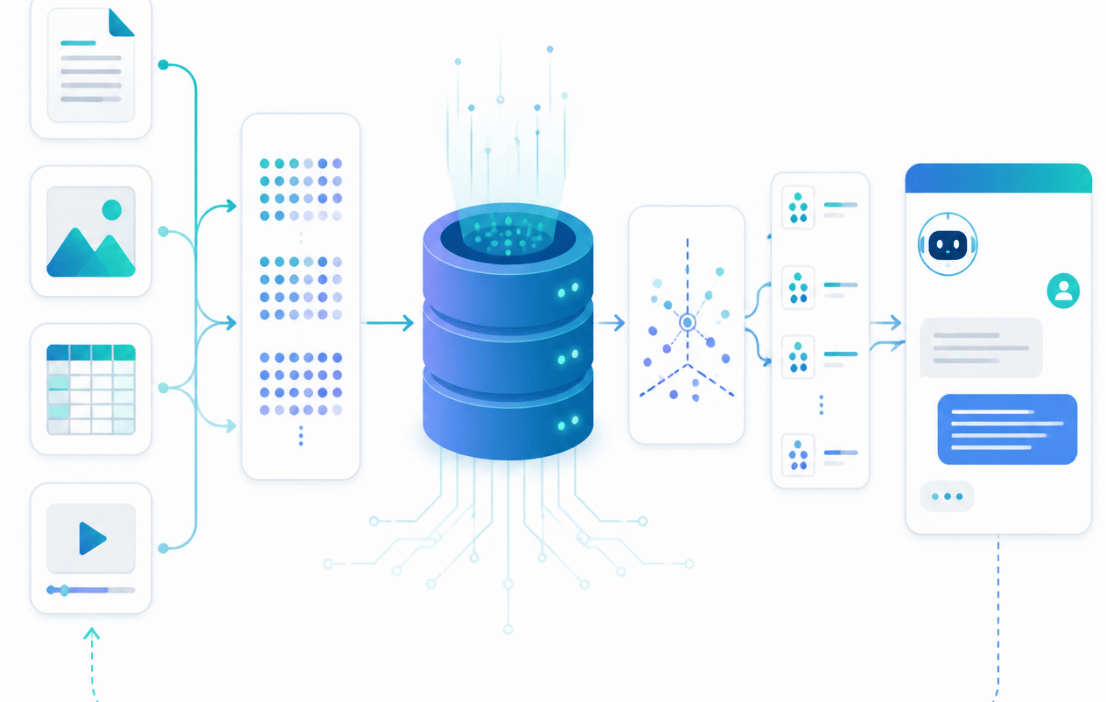
Vector databases follow a process that connects original data with numerical representations. The process usually includes data preparation, embedding generation, storage, and similarity search.
Let’s understand each stage.
1. Data Collection and Preparation
The first step involves collecting the information an application needs to search.
This information could include:
- Product descriptions.
- Website pages and blog posts.
- Customer support documents.
- PDF files and reports.
- Images and audio recordings.
- Internal company knowledge.
The system prepares this information before creating embeddings. For documents, this may involve removing unwanted formatting and splitting long content into smaller sections.
This step matters because poor data preparation can affect search quality. If important information gets removed or split incorrectly, the system may retrieve incomplete results.
2. Converting Data into Vector Embeddings
An embedding model converts the prepared information into numerical vectors.
For example, imagine a company has three customer support documents:
- How to reset an account password.
- How to update billing information.
- How to track a product delivery.
The embedding model converts each document into a numerical representation. A user’s question also goes through the same embedding process.
The resulting vectors help the system identify related information. A question about changing account access may match the password document. It does not need to contain the exact same wording.
Different embedding models produce different vector representations. Their dimensions and performance can also vary. A system must use compatible embeddings for meaningful comparisons.
3. Storing Vectors and Related Information
The vector database stores embeddings so applications can search them later.
It may also store additional information, often called metadata. This can include document names, product IDs, categories, dates, and access permissions.
For example, a business knowledge system might store:
- Vector embedding of a document section.
- Document title.
- Department name.
- Date of the last update.
- Source document location.
This extra information helps the application filter and display useful results. It also helps users trace an answer back to its source.
4. Searching for Similar Vectors
When someone enters a query, the embedding model converts it into a vector. The database then compares that vector with stored vectors.
It uses similarity or distance calculations to identify relevant matches.
Common comparison methods include:
Cosine similarity: Measures the angle between two vectors. It is widely used to compare semantic relationships.
Euclidean distance: Measures the straight-line distance between two points in vector space.
Dot product: Calculates the product of corresponding vector values. It can help compare vector alignment, depending on how the embeddings are produced.
The database returns the closest matches based on the selected search method.
5. Returning Results to the Application
The application receives the matching records and uses them for the next step.
A search engine may display relevant documents. A recommendation system may suggest similar products. An AI assistant may send the retrieved information to a language model.
This final step depends on the application. A vector database finds relevant information, but it does not automatically produce a complete business answer.
Vector Database vs Traditional Database
Traditional databases and vector databases solve different problems. Both can support modern applications, but their search methods are not the same.
A traditional relational database stores structured information in tables. It works well when applications need exact values, relationships, and filters.
For example, an order management system may search for an order using its unique ID. It can also filter orders by date, customer, or payment status.
A vector database focuses on similarity search. It helps applications find information with related meanings, even when the wording differs.
Here are the main differences:
- Data representation: Traditional databases commonly store text, numbers, dates, and structured records. Vector databases store numerical embeddings alongside related information.
- Search method: Traditional databases use queries, conditions, and indexes. Vector databases compare vectors to find similar items.
- Main purpose: Traditional databases handle transactions and structured records. Vector databases support semantic search and similarity-based retrieval.
- Typical use: Traditional databases support billing, inventory, and customer records. Vector databases support AI search, recommendations, and RAG applications.
- Result matching: Traditional searches often depend on exact values or defined conditions. Vector searches can identify related meaning.
This does not mean businesses must replace traditional databases with vector databases.
Many applications use both. A customer platform may keep account details in a relational database. It may use a vector database to search support conversations and product documentation.
The two systems can work together to support different requirements.
Why Are Vector Databases Important for AI Applications?
AI models can process large amounts of information, but they still need relevant context. A language model may generate an answer without knowing the latest company policy or product details.
Vector databases help applications retrieve useful information before generating a response.
This is one reason they have become important in modern AI development.
1. They Support Semantic Search
Traditional keyword search looks for matching terms. Semantic search focuses on the meaning behind a query.
Suppose someone searches for “ways to lower electricity bills.” A semantic search system may also find content about reducing power consumption or improving energy efficiency.
The wording differs, but the subject remains closely related.
Vector databases make this type of search possible by comparing embeddings. Businesses can use it across websites, knowledge bases, product catalogues, and internal documents.
2. They Improve AI Chatbots
Basic chatbots often depend on predefined questions and answers. They may fail when users ask something in an unfamiliar way.
An AI chatbot connected to a vector database can retrieve relevant information from a document collection. It can then use that information to prepare a response.
For example, a software company could connect its chatbot to product guides and troubleshooting documents. Customers could ask questions using everyday language.
The chatbot would search for related sections before responding. This can make support more useful and reduce repeated questions for human teams.
3. They Help Build RAG Applications
Retrieval-Augmented Generation, or RAG, combines information retrieval with generative AI.
A RAG application searches an external knowledge source before asking a language model to generate an answer. A vector database often handles the semantic retrieval part.
Consider an employee asking, “What is our process for approving travel expenses?”
The application converts the question into an embedding. It searches company documents for relevant sections. It then sends those sections to the language model as context.
The model uses the retrieved information to prepare an answer.
RAG can help responses reflect company-specific information. However, it does not guarantee accuracy. Results still depend on source quality, retrieval settings, permissions, and model behaviour.
4. They Power Recommendation Systems
Recommendation systems need to identify products, videos, articles, or services that match user interests.
Vector embeddings can represent product features and user preferences. A vector database can compare these representations to find similar items.
For example, an online store may recommend products based on descriptions and browsing patterns. A video platform may suggest content with similar topics.
These recommendations can go beyond simple category matching. They can consider patterns within the underlying data.
5. They Support Image and Multimedia Search
Vector databases are not limited to written content.
Embedding models can convert images, audio, and other media into numerical representations. Applications can then search for similar items.
A retail business could allow customers to upload a product image. The system could find visually similar products in its catalogue.
A media company could search an archive for images with related visual features. A learning platform could organise audio or video resources by content.
The results depend on the embedding model and the type of information it supports.
Common Business Use Cases of Vector Databases
Vector databases have practical applications across different industries. Their value depends on the type of information a business handles and the problems it wants to solve.
E-Commerce and Online Retail
Online stores manage large product catalogues. Customers may describe products differently from the wording used in product listings.
Vector search can help match customer intent with relevant products.
For example, someone searching for “a lightweight laptop for office work” may find products described as portable business laptops. This can make product discovery easier.
Retailers can also use embeddings for product recommendations and image-based searches.
Healthcare and Medical Research
Healthcare organisations manage clinical documents, research papers, medical guidelines, and patient information.
With suitable security and access controls, vector search can help authorised professionals find relevant information across approved document collections.
For example, a research team may search for papers discussing a particular treatment approach. The system can retrieve related material even when authors use different terminology.
Such systems need strict privacy controls and expert review. They should not replace clinical judgement or make unsupported medical decisions.
Banking and Financial Services
Financial organisations handle policies, reports, transaction records, and customer queries.
Vector databases can support internal knowledge search. Employees may use natural language to find relevant compliance documents or service procedures.
They can also support fraud analysis when combined with suitable models and other detection systems. A similarity match alone should not be treated as proof of fraud.
Education and E-Learning
Educational platforms can use vector search to organise lessons, study materials, and learning resources.
A student may search for “how photosynthesis works” and find lessons titled “the process of food production in plants.”
The search can connect related concepts without requiring exact phrase matching.
Learning assistants can also retrieve relevant course material before answering student questions.
Software Development and IT Support
Development teams work with code documentation, technical guides, error logs, and project records.
Vector databases can help developers search this information using natural language. They may also support code similarity search and internal troubleshooting assistants.
Teams exploring AI tools for software development can consider vector search as part of a wider development workflow. It can help tools retrieve relevant project knowledge when configured correctly.
How Vector Databases Support Autonomous AI Agents
AI agents often need to retrieve information while completing tasks. They may search company policies, product details, previous interactions, or technical documentation.
A vector database can act as one source of searchable knowledge for these agents.
For example, a customer service agent may need to answer a question about a refund. It can search approved policy documents, retrieve the relevant section, and use that information to prepare a response.
This can support systems built around autonomous AI agents and how they work.
However, a vector database is not an AI agent. It does not independently plan tasks or make decisions. It provides information that another application or model can use.
The quality of an agent’s response still depends on its instructions, tools, retrieved sources, and permission settings.
Popular Vector Database Options
Businesses can choose from several vector database technologies. The right option depends on data size, infrastructure, budget, developer skills, and application requirements.
Here are some commonly used options.
Pinecone
Pinecone is a managed vector database service designed for similarity search and AI applications.
It can support semantic search, recommendation systems, and RAG workflows. A managed service can reduce the operational work involved in running database infrastructure.
Businesses should review its pricing, deployment options, data controls, and integration requirements before choosing it.
Weaviate
Weaviate is an open-source vector database that supports vector search and hybrid search.
Hybrid search combines semantic similarity with keyword matching. This can help applications handle both meaning-based queries and exact terms.
For example, a technical search tool may need to understand a general question while also finding a specific product code. Combining both methods can improve the search experience.
Milvus
Milvus is an open-source vector database built for similarity search across large collections of vector data.
It can support applications that need to store and search many embeddings. Teams should assess its deployment and management requirements against their infrastructure.
Chroma
Chroma is an open-source database designed for AI applications that use embeddings.
Developers can use it when building prototypes and applications that need vector search. Its suitability depends on the scale and operational needs of the project.
PostgreSQL with pgvector
Businesses already using PostgreSQL may consider pgvector.
This extension adds vector storage and similarity search capabilities to PostgreSQL. It supports exact nearest-neighbour search and approximate indexing methods such as HNSW and IVFFlat.
This can be useful when a business wants relational data and vector search within the same database environment.
The best option is not always the most specialised platform. A business should test its actual workload before making a decision.
Benefits of Using Vector Databases
Vector databases offer several benefits for applications that depend on similarity search.
Better search relevance: They can find related information even when users do not use the same words as the source material.
Support for AI applications: They provide a retrieval layer for chatbots, RAG systems, recommendation engines, and other AI products.
Multiple data types: With suitable embedding models, applications can search text, images, audio, and other media.
Flexible retrieval: Developers can combine similarity search with metadata filters and, where supported, keyword search.
Scalability options: Many vector database systems provide indexing and deployment options for larger collections of embeddings.
These benefits do not happen automatically. Good results require suitable data, embedding models, indexing, and regular testing.
Challenges and Limitations of Vector Databases
Vector databases can improve search, but they also introduce technical and operational challenges.
Data Quality Affects Search Results
An embedding model cannot fix every problem in the source data.
Duplicate documents, outdated information, missing context, and poor formatting can reduce search quality. Businesses should clean and organise their data before indexing it.
Embedding Models Need Careful Selection
Different embedding models produce different results. A model trained for general text may not perform well for specialised medical or technical content.
Teams should test models using real queries from their intended users.
Storage and Infrastructure Costs
Vector databases store embeddings and often maintain indexes for faster retrieval. Large collections can require significant storage and memory.
Costs may also include embedding generation, database hosting, network usage, and application processing.
Businesses should estimate the full cost rather than looking only at the database subscription.
Search Results May Not Always Be Accurate
A vector database returns items based on similarity. Similarity does not always mean correctness.
A retrieved document may discuss the same topic but contain outdated or irrelevant information. Applications need suitable filters, ranking methods, and source checks.
Security and Access Control Matter
Business documents may contain confidential information. Search systems must respect user permissions.
For example, an employee should not receive information from a restricted HR document simply because its embedding closely matches a query.
Access checks should apply during retrieval, not only when displaying the final result.
How to Choose the Right Vector Database for Your Business
Choosing a vector database requires more than comparing product features. Start with the problem your application needs to solve.
1. Define the Main Use Case
Decide whether you need semantic search, recommendations, document retrieval, image search, or a RAG application.
A clear use case helps narrow down the technical requirements.
2. Estimate Your Data Volume
Consider how many records and embeddings the system must store. Also estimate how frequently the data will change.
A small internal knowledge assistant may not need the same infrastructure as a large shopping platform.
3. Check Search Performance
Test query speed and result relevance using real user questions. Measure how often the system retrieves useful information.
Do not judge performance through a few demonstration queries alone.
4. Review Integration Options
Check whether the database works with your programming languages, cloud environment, embedding models, and existing data systems.
A solution that fits your current infrastructure may reduce development and maintenance work.
5. Understand Security and Compliance
Review authentication, encryption, access controls, backups, data retention, and deployment options.
Businesses handling personal or regulated information should involve their security and compliance teams.
6. Calculate Total Ownership Costs
Include hosting, storage, indexing, maintenance, developer time, and embedding generation.
A low initial price may not represent the lowest long-term cost.
Before deployment, review common AI implementation mistakes that can cost businesses. A clear plan can help teams avoid unnecessary spending and technical problems.
What Is the Future of Vector Databases?
Vector databases are likely to remain an important part of AI infrastructure as more applications use semantic retrieval.
One area of development is multimodal search. Applications can use embeddings from different data types to connect text, images, audio, and video.
Hybrid search is another important area. It combines keyword matching with semantic similarity. This approach helps applications find information by meaning while preserving exact matches for names, codes, and technical terms.
Database systems are also improving their indexing, filtering, and scaling options. These improvements can help developers manage larger collections and build more responsive applications.
At the same time, vector databases will continue to work alongside traditional databases. Businesses still need reliable systems for transactions, customer records, inventory, and financial data.
The future is not about replacing every database with a vector database. It is about choosing the right data system for each task.
Frequently Asked Questions About Vector Databases
1. What is a vector database in simple terms?
A vector database stores numerical representations of information called embeddings. It helps applications find similar items based on meaning or other patterns rather than exact keyword matches.
2. How does a vector database work?
An embedding model converts information into numerical vectors. The database stores those vectors and compares them with query vectors. It then returns the closest matches based on a selected similarity or distance method.
3. What are vector embeddings?
Vector embeddings are numerical representations of data. They are created by machine learning models and help applications compare relationships between text, images, audio, and other information.
4. What is the difference between vector search and keyword search?
Keyword search looks for matching terms. Vector search compares numerical representations to find related meaning. Hybrid search combines both methods.
5. Are vector databases used in RAG applications?
Yes. Vector databases often retrieve relevant document sections in RAG applications. A language model can then use those sections as context when generating an answer.
6. Can a traditional database store vectors?
Some traditional databases support vector storage through extensions or built-in features. PostgreSQL, for example, supports vector operations through pgvector.
7. Which vector database is best?
There is no single best option for every project. Pinecone, Weaviate, Milvus, Chroma, and PostgreSQL with pgvector serve different needs. Compare them based on workload, cost, security, and infrastructure.
8. Are vector databases only used for AI chatbots?
No. They also support semantic search, product recommendations, image retrieval, document discovery, and multimedia applications.
9. Do vector databases replace traditional databases?
No. Traditional databases remain useful for structured records and transactions. Vector databases support similarity search. Many applications use both systems together.
10. Are vector databases expensive?
Costs depend on data volume, hosting, memory, indexing, query traffic, and maintenance. Some open-source options can reduce licensing costs, but businesses still need to account for infrastructure and operational expenses.
Conclusion
Vector databases help modern applications search information based on meaning and similarity. They provide an important retrieval layer for semantic search, AI chatbots, recommendation systems, and RAG applications.
However, choosing a database is only one part of the process. Businesses must also select suitable embedding models, prepare reliable data, protect access, and test search quality.
The right solution depends on the application’s purpose and expected workload. Some projects may work well with PostgreSQL and pgvector. Others may need a dedicated vector database.
A practical starting point is to identify one search problem, prepare a small dataset, and test the results. This gives your team a clearer view of the technology’s value before a larger investment.