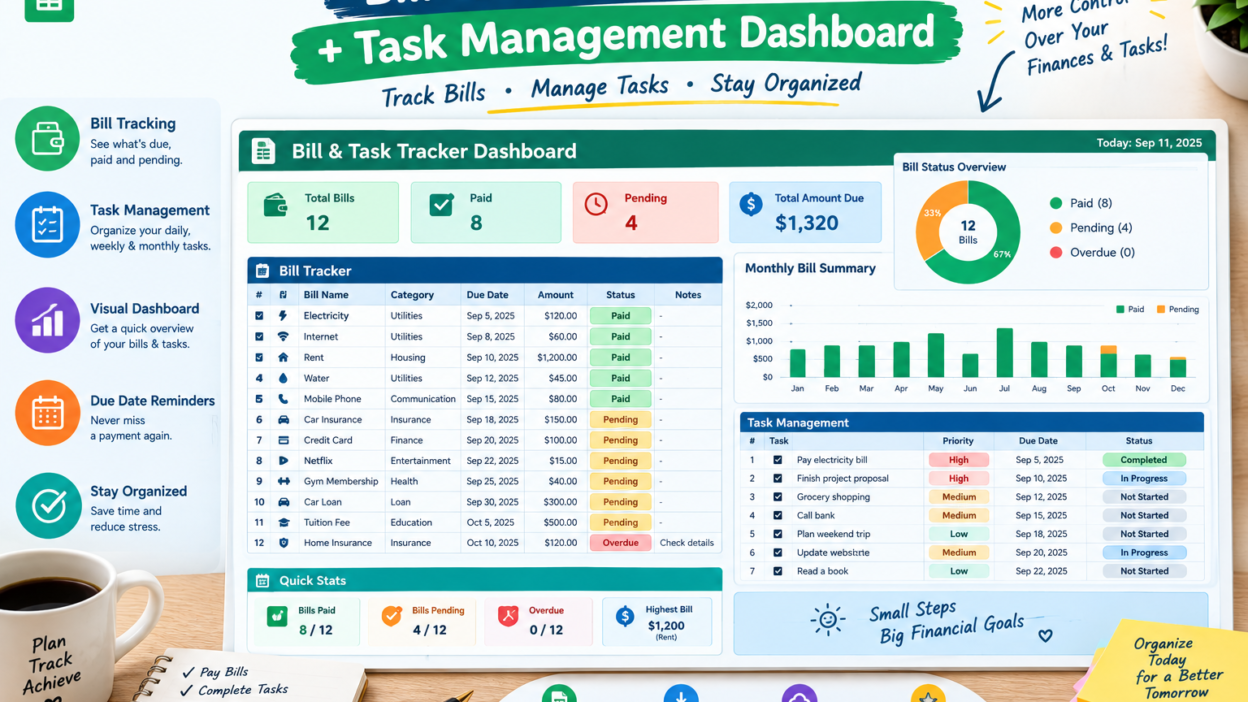
Bill Tracker Spreadsheet & Task Management Dashboard. Manage bills and daily tasks with a bill tracker spreadsheet and task management dashboard designed to keep your finances and workflow organized.
Keeping track of bills and tasks can quickly become overwhelming when everything is scattered across notes, emails, calendars, and reminders. A bill tracker spreadsheet provides a simple way to monitor payments, while a task management dashboard helps organize responsibilities and deadlines.
Together, these tools can create a more structured system for managing both personal finances and everyday work.
What Is a Bill Tracker Spreadsheet?
A bill tracker spreadsheet is a digital worksheet designed to record and monitor recurring and one-time bills. Instead of wondering whether a payment has been made, you can keep important details in one convenient location.
Useful columns may include:
- Bill name
- Due date
- Amount
- Payment status
- Payment method
- Recurring frequency
- Notes
You can also use formulas or conditional formatting to highlight upcoming and overdue payments.
How a Task Management Dashboard Works
A task management dashboard brings your tasks into an organized visual overview. It can show what needs to be completed, what is currently in progress, and what has already been finished.
A basic dashboard might include task names, deadlines, priorities, assigned people, and completion status. This makes it easier to see your workload without searching through multiple lists.
Think of it as a control center for your daily responsibilities.
Keep Bill Payments on Schedule
Missing a bill deadline can create unnecessary stress. A bill tracker spreadsheet makes upcoming payments easier to spot by putting due dates and payment information together.
You can organize bills by week or month and mark each payment as soon as it is completed. Adding a “days remaining” column can make the tracker even more useful for planning ahead.
A few minutes of updating can save you from the classic “Wait… did I already pay that?” moment.
Prioritize Important Tasks
Not every task deserves the same level of attention. A task management dashboard can help you separate urgent responsibilities from tasks that can wait.
Try using priority categories such as:
- High priority
- Medium priority
- Low priority
- Waiting
- Completed
This simple structure helps you focus your energy where it is needed most instead of trying to tackle everything at once.
Combine Financial and Productivity Planning
Bills and tasks may seem like separate topics, but they both involve deadlines and organization. Combining a bill tracker spreadsheet with a task management dashboard can give you a broader view of your schedule.
For example, you could create a task reminding you to review upcoming bills every Friday. You might also add tasks for budgeting, reviewing subscriptions, or checking monthly expenses.
This creates a practical routine instead of relying entirely on memory.
Add Visual Features to Your Dashboard
A spreadsheet becomes more engaging when important information is easy to see. Charts, progress bars, status indicators, and conditional formatting can turn ordinary data into a useful dashboard.
For example, you could display:
- Total bills due this month
- Paid versus unpaid bills
- Completed tasks
- Pending tasks
- High-priority tasks
- Upcoming deadlines
These visual elements allow you to understand your current situation at a glance.
Make Your Spreadsheet Easy to Maintain
The best organizational system is one you will actually use. Keep your bill tracker spreadsheet simple enough to update regularly.
Likewise, avoid filling your task management dashboard with unnecessary categories. Start with the information you genuinely need and add features gradually.
Set aside a few minutes each day or week to update statuses, enter payments, and review upcoming deadlines. Consistency is more useful than complexity.
Benefits of Using Excel for Organization
Excel and similar spreadsheet tools offer flexibility without requiring complicated software. You can create customized tables, apply formulas, filter information, and build dashboards around your personal workflow.
A bill tracker spreadsheet can support better payment organization, while a task management dashboard can make workloads easier to understand and manage.
The result is a system that can grow with your needs.
Final Thoughts
A bill tracker spreadsheet can help you stay aware of payments, due dates, and monthly obligations, while a task management dashboard can bring your daily responsibilities into one organized view.
Whether you’re managing household finances, freelance work, office responsibilities, or personal goals, a well-designed spreadsheet can make organization feel much easier. Start simple, update it consistently, and let your spreadsheet do some of the remembering for you.