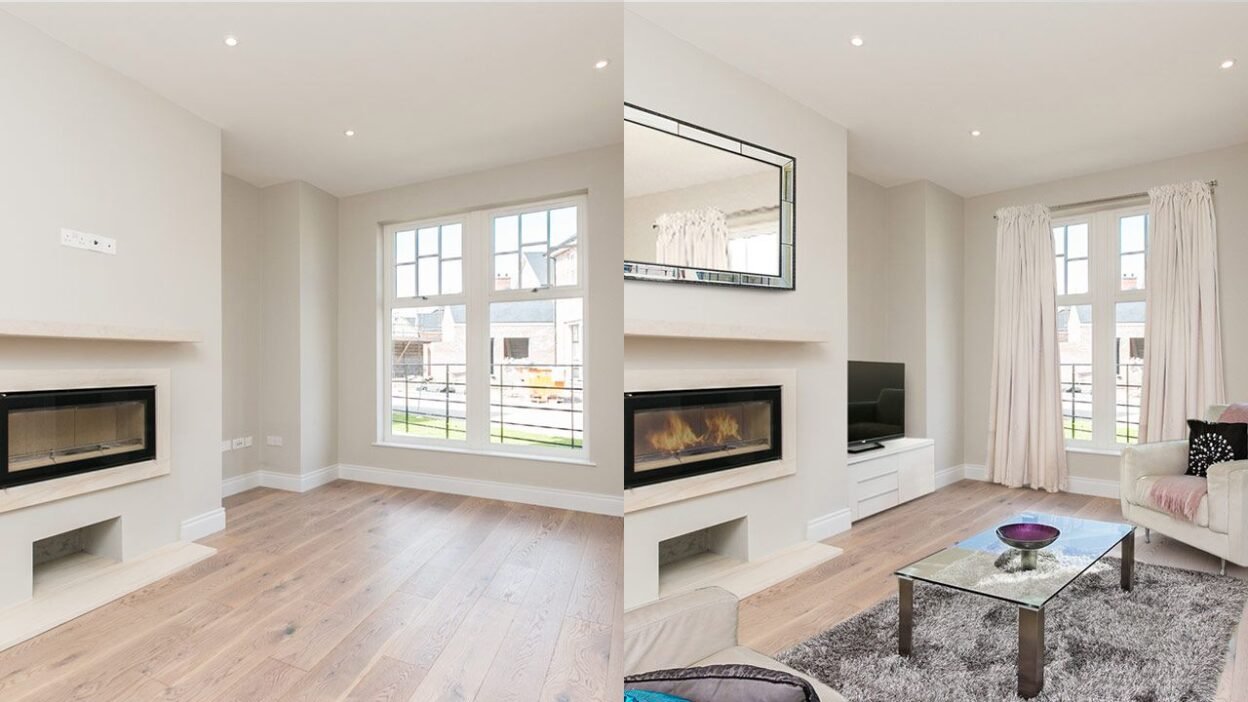
An empty property can be difficult to present online. Buyers can see the dimensions, windows, flooring, and walls, but they may struggle to imagine how the space could actually function as a home. This is where virtual staging can make a useful difference by adding furniture and decorative elements directly to a property photograph.
The goal is not to redesign the house or create an entirely different property. Good digital staging should help viewers understand the possibilities while keeping the underlying room recognizable.
Which Rooms Benefit the Most?
Not every room needs to be staged. The greatest benefit usually comes from spaces where furniture helps communicate scale and purpose.
Living rooms are an obvious example. A sofa, coffee table, rug, and carefully selected lighting can show how much usable space is available. Bedrooms can become easier to understand when viewers can see where a bed and bedside furniture could fit. Dining rooms can also benefit because a table and chairs provide an immediate sense of proportions.
Smaller rooms should be handled carefully. Adding too many pieces can make a compact room appear crowded. In those cases, a simple layout with appropriately sized furniture may communicate the space better than an elaborate design.
Start With the Right Photograph
The quality of the original photograph has a major influence on the final result. A dark, crooked, or heavily obstructed image gives the editing process less useful information to work with.
Try to photograph the room from a natural viewing height and choose an angle that shows as much of the floor area as possible. Keep major architectural elements visible, including doors, windows, built-in storage, fireplaces, and permanent fixtures.
It is also helpful to remove distracting temporary objects before taking the picture. A clean starting image makes it easier for furniture and décor to look naturally positioned.
Choose a Style That Fits the Property
Furniture should not look disconnected from the home. A modern apartment may suit clean lines and neutral colors, while a traditional property might work better with warmer materials and classic furniture.
Think about the likely audience as well. A family-sized suburban home may benefit from a comfortable, practical arrangement, whereas a compact city apartment might be more convincing with a minimalist layout.
Rather than creating a dramatically different room, choose a style that helps viewers understand how the existing space could realistically be used.
Tools such as Enhancia.ai can help users furnish vacant property images and explore different visual approaches without physically moving furniture.
How Digital Staging Differs From Physical Staging
Physical staging changes the property itself by bringing in real furniture, décor, and accessories. That means prospective buyers can experience the furnished space during an in-person visit.
Digital staging changes only the photograph. This makes it particularly useful for vacant listings, rental marketing, properties between occupants, and situations where arranging physical furniture would be inconvenient.
Neither approach is automatically better in every situation. Physical furniture can provide a stronger sense of texture and scale during an inspection, while digital furnishing offers greater flexibility when the primary challenge is presenting the property online.
Some property professionals may also combine both approaches, using physical staging for key rooms while digitally furnishing additional photographs.
Important Things to Check Before Publishing
A staged image should remain an honest representation of the property. Furniture can be added, but permanent features should not be altered in a way that could mislead potential buyers or tenants.
This is especially important with room size. Oversized furniture can make a room appear smaller or larger than it really is, while removing structural elements from an image can create an inaccurate impression.
Disclosure is another consideration. Property portals, real estate organizations, and local rules may require staged photographs to be identified as digitally furnished. Requirements differ by market, so check the rules that apply to your listing before publication.
The same principle applies when using a virtual staging ai tool: review every finished image before it goes live. Look closely at furniture proportions, shadows, windows, doors, flooring, and other fixed details. Automated results can look convincing at first glance but still contain small visual inconsistencies.
A Simple Workflow for Better Results
A practical process can keep the work consistent.
First, photograph the property carefully. Next, select the rooms where furniture will genuinely help. Choose a restrained style that suits the home, generate the furnished versions, and compare them with the original photographs.
Keep the original images available alongside the finished versions. This makes it easier to confirm that the property itself has not been visually misrepresented.
Final Thoughts
Effective property presentation is not about adding as much furniture as possible. It is about helping viewers understand the room while keeping the image believable.
Choose the right rooms, start with strong photographs, use appropriately scaled furniture, preserve permanent features, and review disclosure requirements before publishing. Used thoughtfully, digital furnishing can make vacant spaces easier to understand while keeping the actual property at the center of the presentation.